Stream2Clips: Hours of Stream
to Viral 9:16 Shorts on Your GPU.
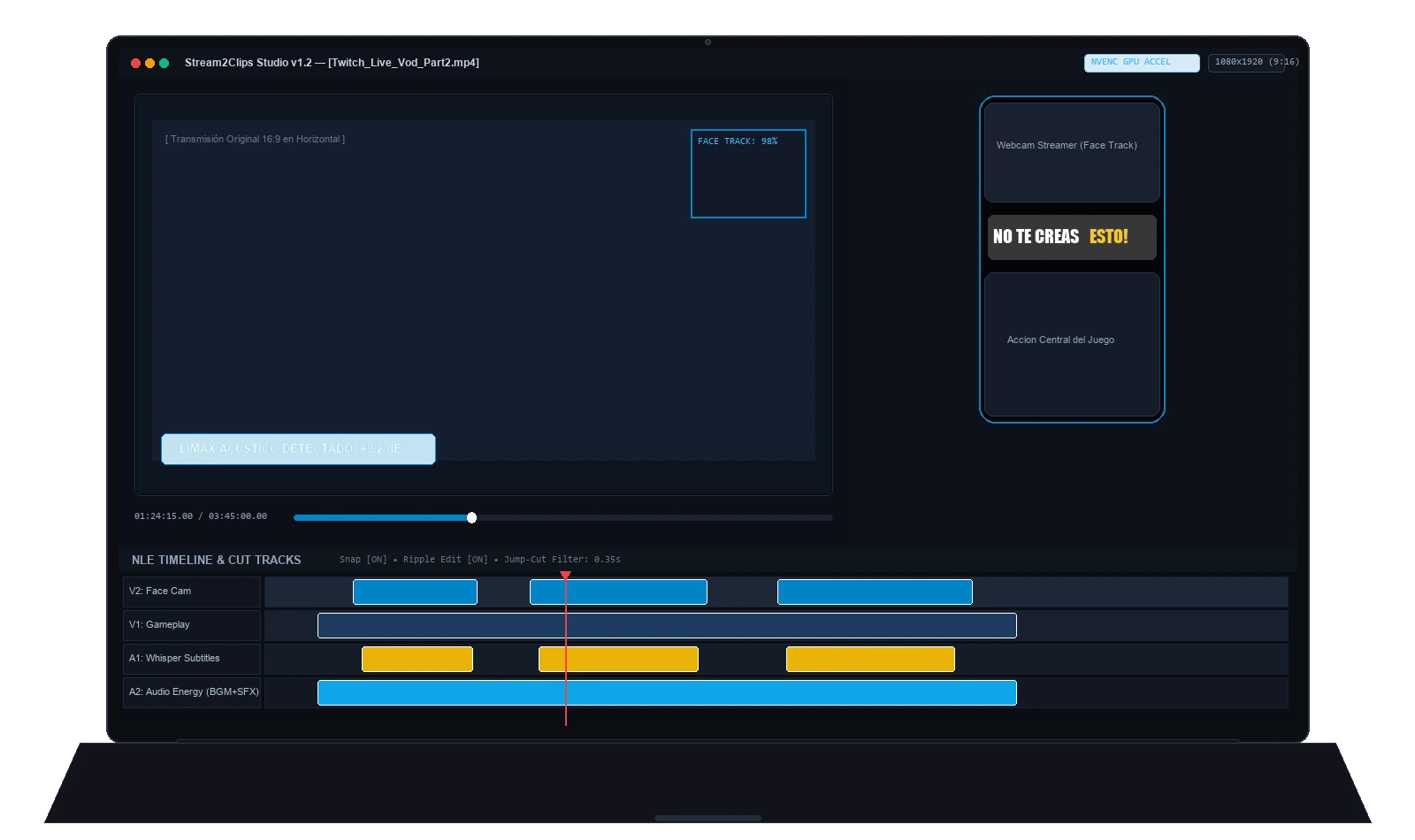
The Windows desktop studio for streamers and long-form video creators. Automatically detect high-energy highlights, reframe webcam + gameplay to vertical 9:16, and burn Whisper karaoke captions locally—with zero cloud credits.
Works with all your live streams & local recordings
Engineered Features
Built for High-Volume Streamer & Editor Workflows
Automate highlight detection, mobile 9:16 reframing, and word-level caption sync without bloated timelines or cloud upload wait times.
Climax & Energy Detection
Spectral audio analysis scans decibel spikes, laughter bursts, and intense gameplay moments to isolate high-retention clips automatically.
Vertical 9:16 Split Screen
Converts 16:9 widescreen and 21:9 ultrawide streams into crisp 1080x1920 layouts with face-tracked webcam framing and zero stretched pixels.
Animated Karaoke Subtitles
Silero VAD paired with Whisper AI prevents subtitle drift during loud screams and laughter, generating Hormozi & MrBeast captions locally.
Creator Workflows
Platform Clippers & Cloud Alternatives
Free OpusClip Alternative
Compare local GPU batch clipping with zero credit caps against cloud SaaS queues.
TwitchAI Twitch Clip Maker
Ingest 6+ hour Twitch VODs and render batches of vertical TikToks and Shorts fast.
KickKick Clip Maker (9:16)
Turn Kick streams into captioned Shorts with Split Screen and 1000Hz bleep filter.
ArchitectureLocal GPU vs Cloud AI
Why NVENC, AMF, and QuickSync beat shared cloud rendering queues and monthly credits.
Transparent Pricing
Choose the Right Plan for Your Channel
Start free with unlimited local GPU batch exports, or upgrade to Stream2Clips PRO to remove watermarks and unlock VIP retention tools.
Free Evaluation Tier
FreemiumExport unlimited batches of clips with AI and local GPU acceleration at $0.
- 100% unlimited local batch exporting
- AI highlight detection + VOD downloader
- Split, PiP & Immersive 9:16 framing
- NVENC / QSV / AMF GPU acceleration
- Includes official animated watermark
Stream2Clips PRO
Pro MonthlyWatermark-free 60 FPS exports and the full VIP retention toolkit.
- Zero watermarks + unlimited 1080p 60 FPS
- Uncapped AI smart highlight selection
- Dynamic Punch-In Auto-Zoom on peaks
- Anti-Shadowban 1000Hz bleep + asterisks
- Custom PNG camera frames + VIP captions
- 2 simultaneous PCs • Cancel anytime
Stream2Clips PRO Annual
Best ValueJust $10.99 per month billed annually. Save $60 USD per year.
- Flat 31% annual discount ($60 saved)
- Watermark-free + all VIP tools unlocked
- Activate on 2 Windows PCs simultaneously
- Continuous updates & priority support
Common Inquiries
Frequently Asked Questions
What types of content can I process with Stream2Clips?
Stream2Clips is built for live streams and long-form video: Twitch VODs, Kick broadcasts, YouTube Live streams, video podcasts, OBS Studio recordings, and local .mp4, .mkv, or .mov files.
What is included in the Free Evaluation Tier?
The free tier includes 100% unlimited batch exporting with no clip count cap, automated acoustic AI highlight detection, VOD stream downloader, local GPU acceleration, and word-by-word karaoke subtitles. It includes the official animated watermark and reserves VIP tools (Punch-In Auto-Zoom, 1000Hz Anti-Shadowban bleep, custom PNG overlays) for Pro.
How do Pro licensing, cancellation, and refunds work?
Choose Pro Monthly at $15.99/mo or Pro Annual at $131.88/yr ($10.99/mo, saving 31%). Your license key is emailed instantly for up to 2 PCs. Because you can fully test hardware compatibility and export quality with our unlimited Free tier before purchasing, all digital license sales are final and non-refundable—you can cancel renewal anytime with one click.
Does video rendering occur in the cloud or on my local PC?
All highlight detection, Whisper + Silero VAD transcription, and FFmpeg encoding run 100% locally on your graphics card (NVIDIA NVENC, AMD AMF, or Intel QSV). Zero cloud queues, zero upload delays, and total footage privacy.
What are the Windows system requirements?
Minimum: Windows 10 (64-bit), 4-core CPU, 8 GB RAM, and integrated or 2 GB discrete graphics. Recommended: Windows 10/11, 6-8 core CPU, 16 GB RAM, and an NVIDIA GeForce (GTX 16-series or RTX with NVENC) or AMD Radeon GPU with AMF encoding.
Start Turning Your Streams into Shorts Today
Download the Windows desktop studio and harness your local GPU to render vertical content with zero queues.